Multi-Graph Distributed Orchestration with LangGraph
How LangGraph's Pregel engine and PregelProtocol interface let you compose independently deployed AI agents into a unified distributed system -- with streaming, interrupts, and checkpointing across service boundaries.
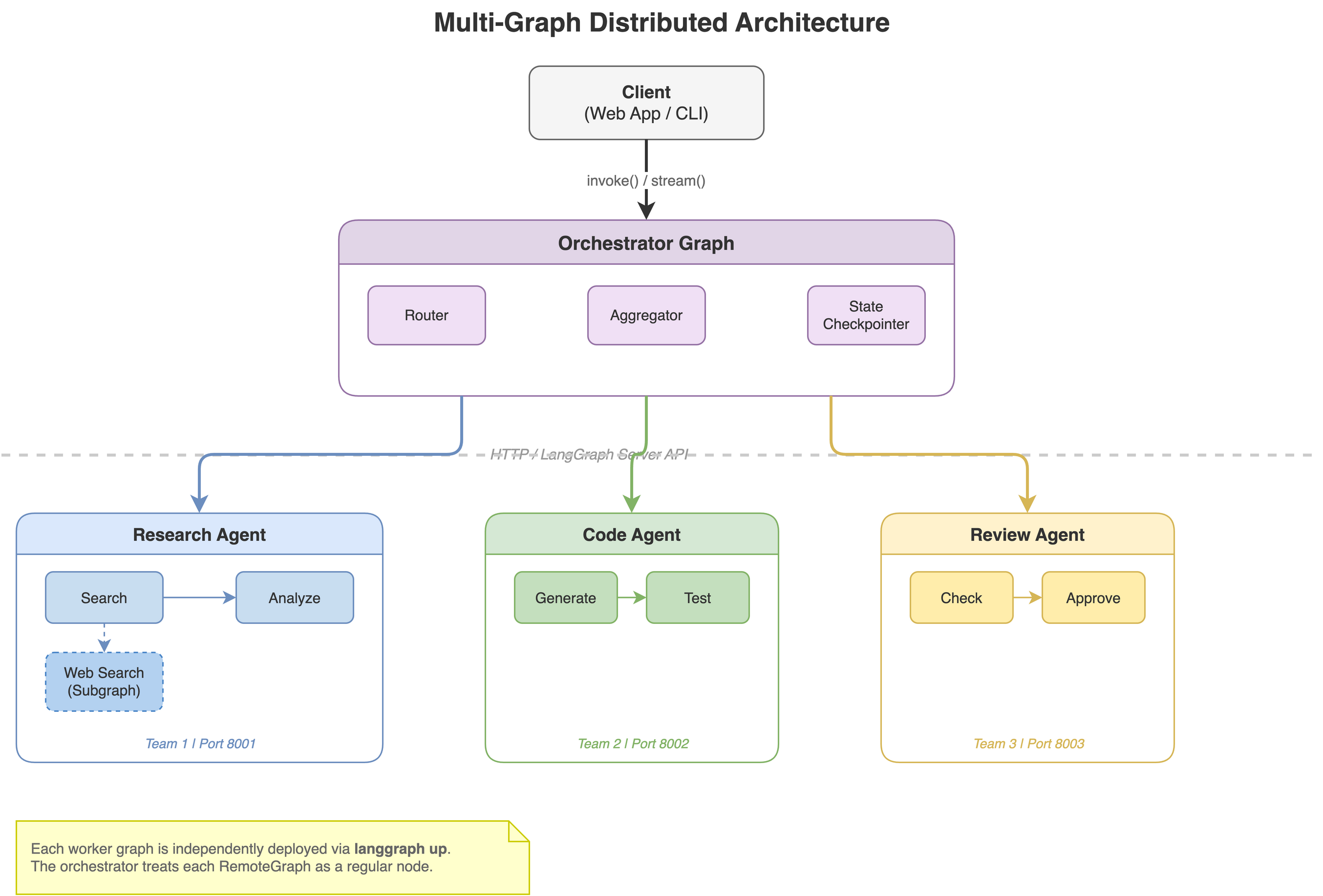
You have a research agent. A coding agent. A review agent. Each built by a different team, deployed on different servers. Now you need them to work together as one system.
This is the multi-graph orchestration problem, and LangGraph solves it with a surprisingly simple idea: a remote graph is just another node.
What is Pregel, and Why Should You Care?
Before diving into multi-graph orchestration, it’s worth understanding the engine that makes it all possible.
LangGraph’s runtime is called Pregel, named after Google’s Pregel – a system designed for processing large-scale graphs. The original Pregel was built to run algorithms like PageRank across billions of web pages. LangGraph borrows the same execution model, but applies it to AI agent workflows.
The Execution Model
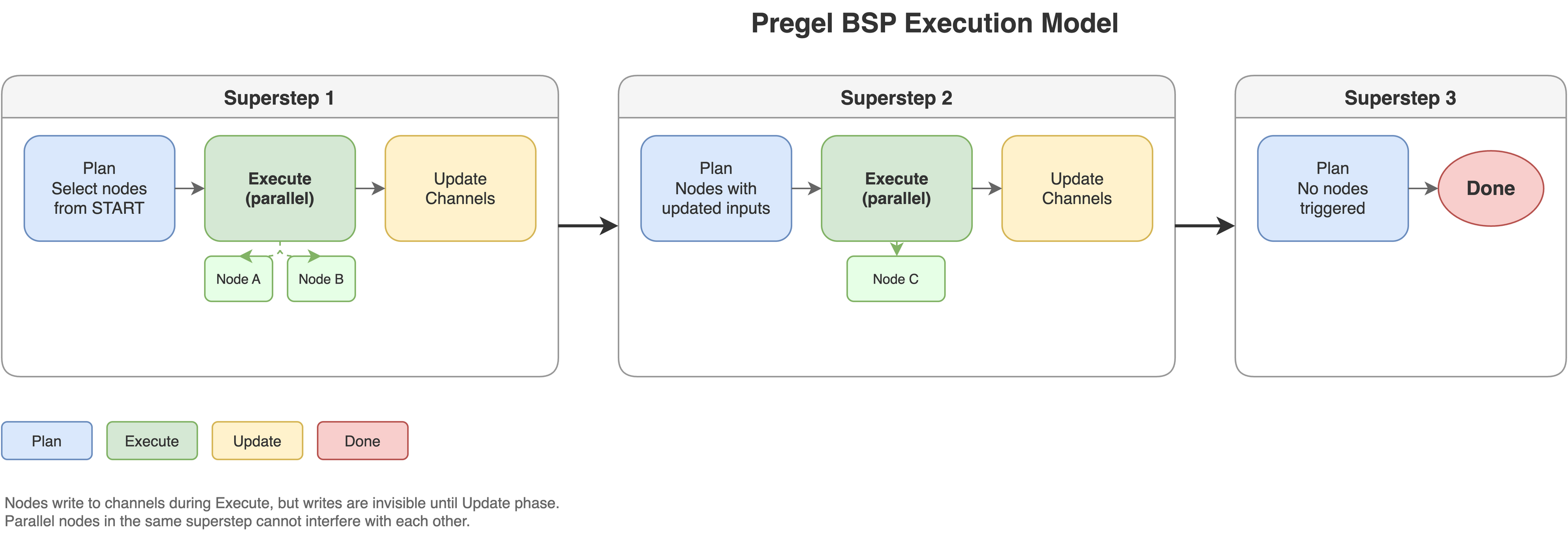
Pregel uses Bulk Synchronous Parallel (BSP) execution. That sounds academic, but the idea is simple. Your graph runs in discrete supersteps, and each superstep has three phases:
-
Plan – Figure out which nodes need to run. On the first step, it’s the nodes connected to
START. On subsequent steps, it’s any node whose input channels were updated in the previous step. -
Execute – Run all selected nodes in parallel. This is the key insight: nodes don’t see each other’s writes during execution. A research node and a coding node running in the same superstep can’t interfere with each other.
-
Update – Apply all node outputs to the shared state channels. Now the writes become visible, and the next superstep can begin.
This repeats until no more nodes are triggered, or the recursion_limit is hit.
Nodes and Channels
In Pregel’s model, nodes don’t call each other directly. They communicate through channels – typed containers that hold state between supersteps:
- LastValue – stores the most recent value (the default for
StateGraphfields) - BinaryOperatorAggregate – accumulates values with a reducer (this is what powers
add_messages) - Topic – pub/sub accumulation for multiple values
- EphemeralValue – temporary values that clear after each step
When you write messages: Annotated[list, add_messages] in your state, you’re defining a BinaryOperatorAggregate channel with add_messages as the binary operator. When two nodes both write messages in the same superstep, the reducer merges them deterministically.
Why This Matters for Distributed Orchestration
The BSP model gives you three properties that are essential for distributed systems:
- Determinism – Parallel nodes can’t race on shared state. The channel update phase ensures consistent ordering.
- Checkpointability – State is clean between supersteps, so you can snapshot it, persist it, and resume later.
- Composability – The entire execution model is behind an interface (
PregelProtocol). Anything implementing that interface – local graph, remote graph, functional entrypoint – can be composed as a node.
Most users never interact with Pregel directly. StateGraph.compile() and @entrypoint both produce Pregel instances under the hood. But understanding the model explains why things like streaming, interrupts, and remote composition work so cleanly – they’re all built on the same superstep-based execution with channel-mediated communication.
The Core Insight
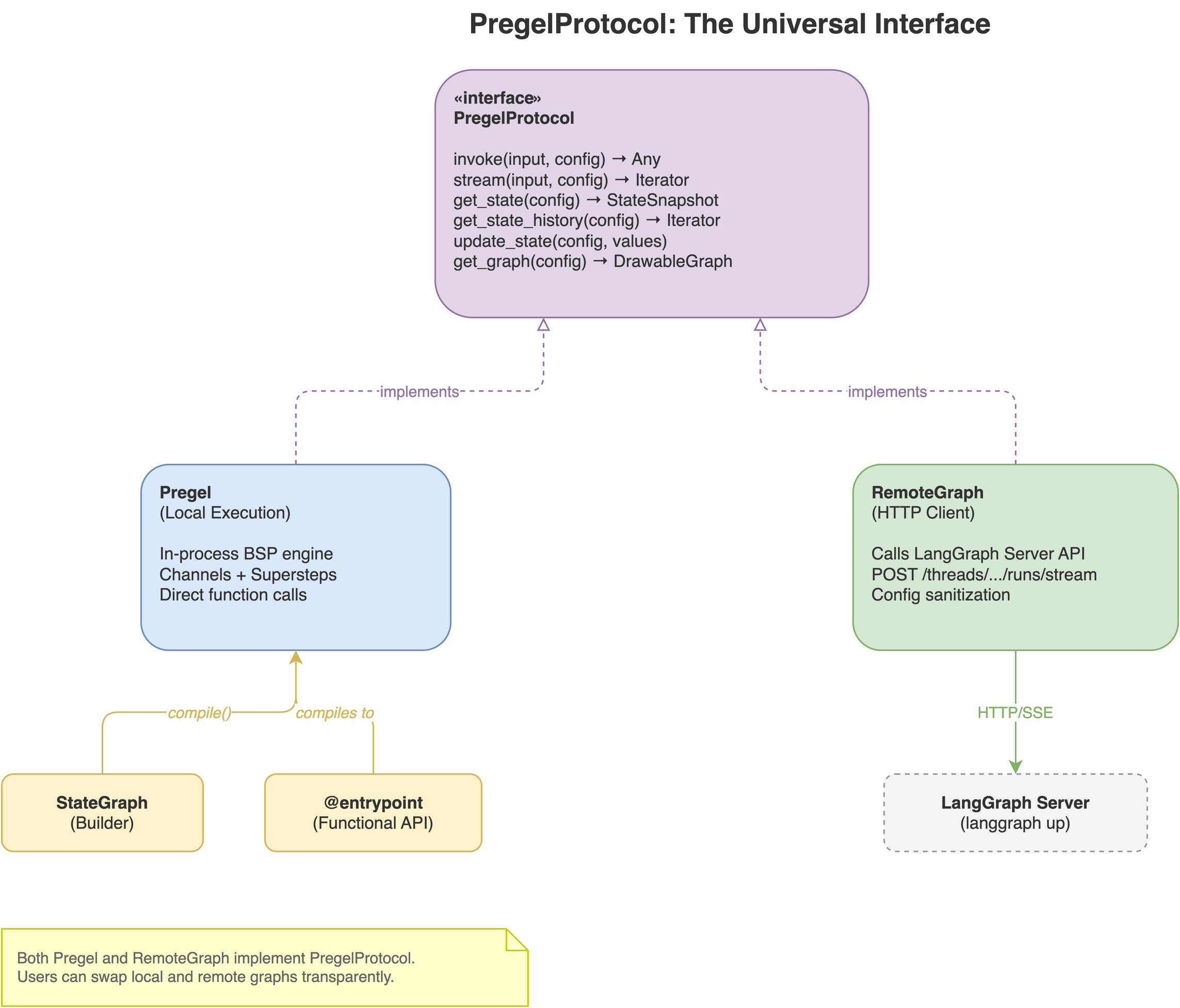
LangGraph’s execution engine (Pregel) and its remote client (RemoteGraph) both implement the same interface – PregelProtocol. This means you can wire a graph running on a server in Tokyo into an orchestrator running on your laptop, and it behaves identically to a local function.
from langgraph.graph import StateGraph, START, END
from langgraph.pregel.remote import RemoteGraph

# These are HTTP clients, not local code
research = RemoteGraph("research-agent", url="https://research.example.com", name="research")
coder    = RemoteGraph("code-agent",     url="https://code.example.com",     name="coder")

# But they wire in like any other node
graph = StateGraph(MyState)
graph.add_node("research", research)
graph.add_node("coder", coder)
graph.add_edge(START, "research")
graph.add_edge("research", "coder")
graph.add_edge("coder", END)

app = graph.compile()
That’s it. invoke(), stream(), interrupts, checkpointing – everything works across the boundary.
Why This Matters
Most AI orchestration frameworks give you one of two options: everything runs in one process, or you’re on your own with REST calls and message queues.
LangGraph gives you a third option: build each agent as an independent graph with its own deployment, its own state, its own team owning it – then compose them with the same API you use for local nodes. No glue code. No custom serialization. No hand-rolled retry logic.
This unlocks architectures that look like real distributed systems:
Each box is independently deployable via langgraph up. Each has its own checkpoint storage. Each can be versioned and rolled back independently. The orchestrator just wires them together.
Building the Orchestrator
State Design
The orchestrator manages coordination state. Worker graphs manage their own domain state. These are separate concerns.
from typing import Annotated, Any
from typing_extensions import TypedDict
from langgraph.graph import add_messages

class OrchestratorState(TypedDict):
    messages: Annotated[list, add_messages]
    plan: list[dict]
    results: Annotated[dict[str, Any], lambda a, b: {**a, **b}]
    status: str
The orchestrator doesn’t need to know the internal state of the research agent. It sends messages in, gets results back. The results field accumulates outputs from multiple workers using a merge reducer.
Routing
Static pipelines are the simplest case, but the real power is in dynamic routing. You can use conditional edges, LLM-based routers, or fan-out patterns.
Conditional routing – pick a worker based on state:
def route(state):
    if "code" in state["messages"][-1].content.lower():
        return "coder"
    return "research"

graph.add_conditional_edges("router", route)
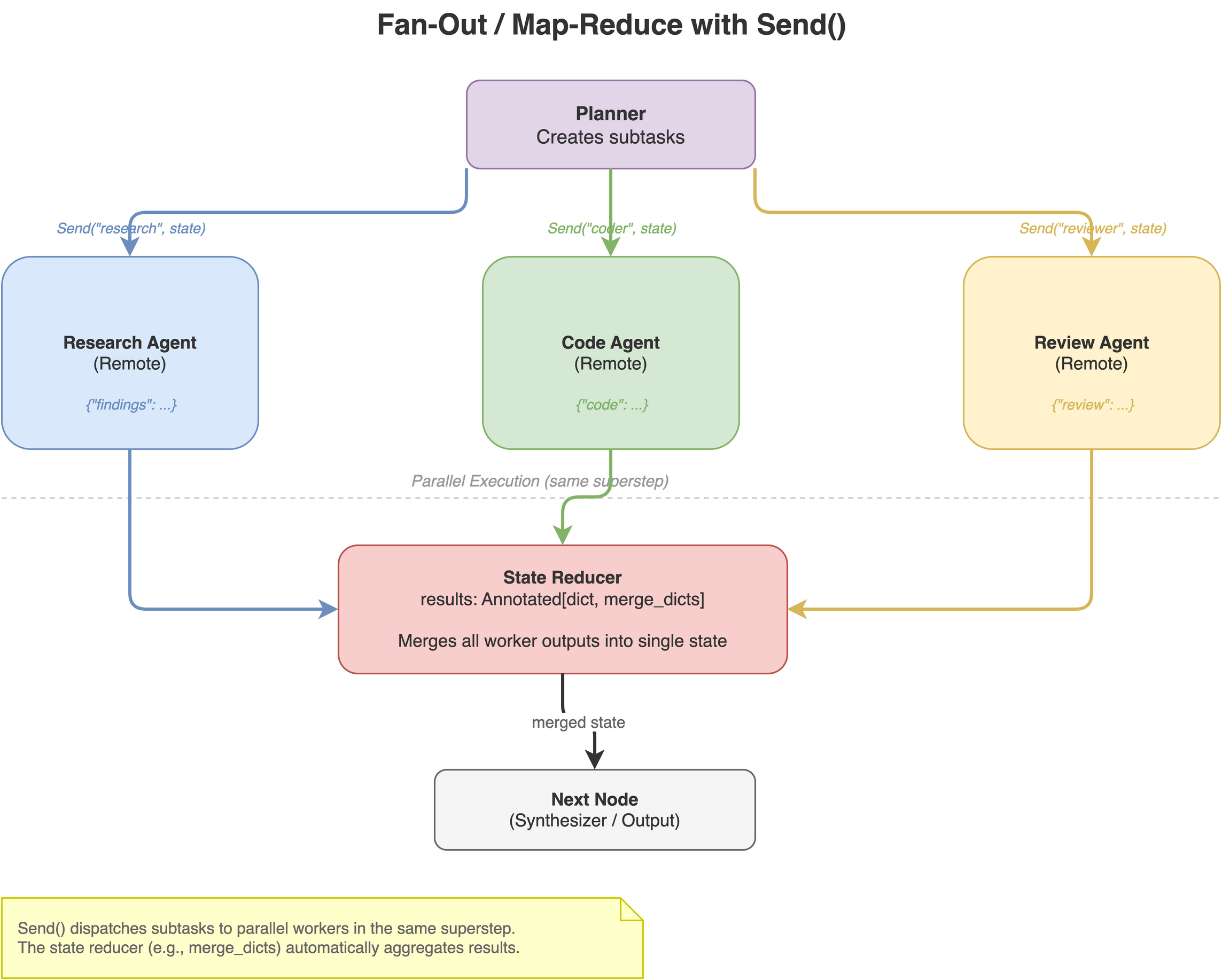
Fan-out with Send – dispatch to multiple workers in parallel:
from langgraph.types import Send

def dispatch(state):
    return [Send(task["worker"], state) for task in state["plan"]]

graph.add_conditional_edges("planner", dispatch)
Each Send triggers a parallel invocation of the target remote graph. Results merge back through the state reducer. This is map-reduce for AI agents.
Streaming Across Service Boundaries
This is where most DIY approaches fall apart. When you nest graphs across HTTP boundaries, you want streaming to just work – token-by-token LLM output from a remote agent should flow through the orchestrator to the client without buffering.
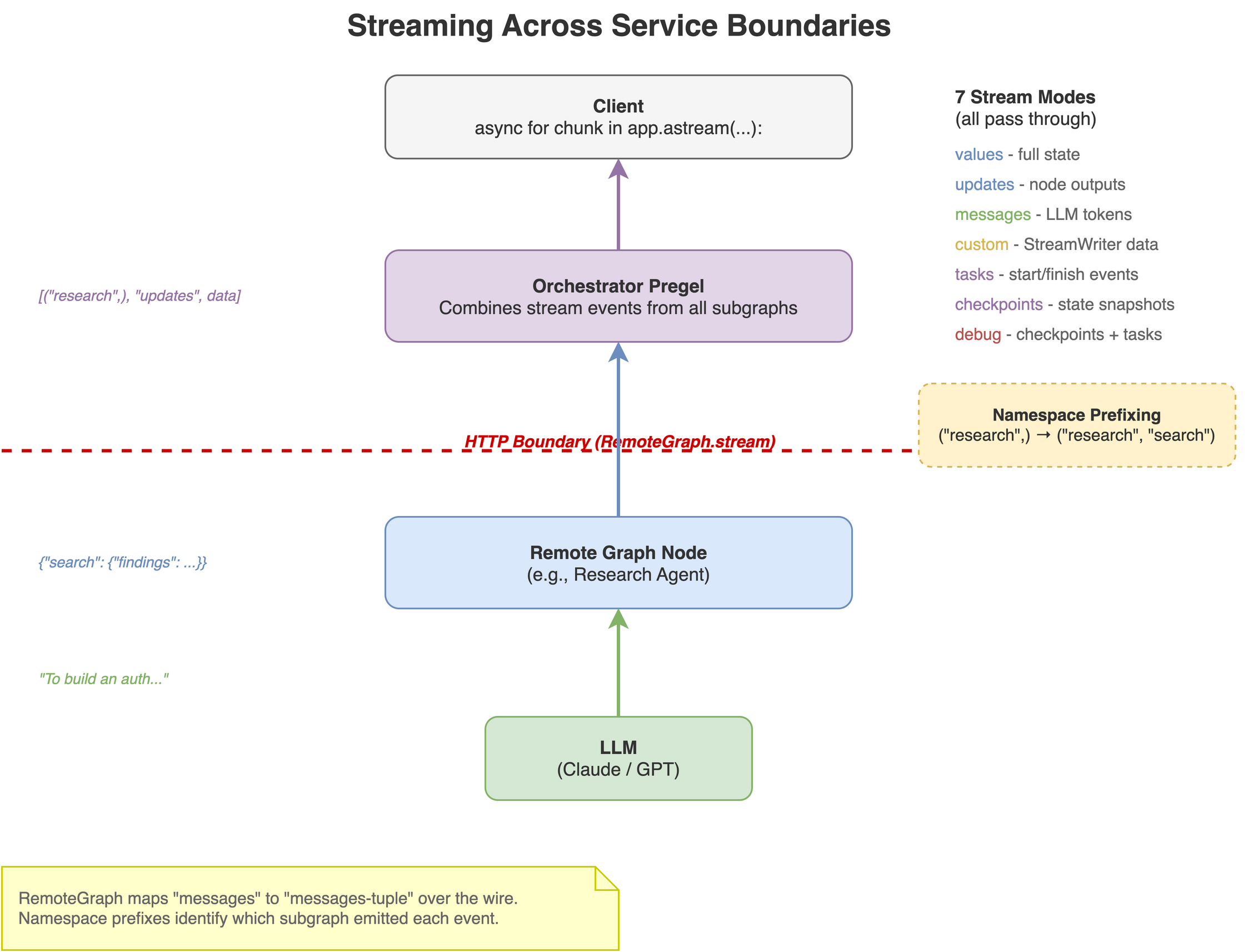
LangGraph handles this automatically. The RemoteGraph stream implementation:
- Forwards the parent’s stream modes to the remote server
- Prepends namespace prefixes so you know which subgraph emitted what
- Pipes events back up through the orchestrator’s stream
async for chunk in app.astream(
    {"messages": [("user", "Build an auth API")]},
    config={"configurable": {"thread_id": "project-1"}},
    stream_mode=["updates", "messages"],
    subgraphs=True,
):
    ns, mode, data = chunk
    origin = "/".join(ns) or "orchestrator"
    print(f"[{origin}] {mode}: {data}")
Output looks like:
[orchestrator] updates: {"planner": {"plan": [...]}}
[research] messages: ("To build", {...})
[research] messages: (" an auth", {...})
[research] messages: (" API...", {...})
[research] updates: {"search": {"findings": "..."}}
[coder] messages: ("```python\n", {...})
[coder] messages: ("from fastapi", {...})
...
All seven stream modes work across boundaries: values, updates, messages, custom, tasks, checkpoints, and debug.
Human-in-the-Loop Across Graphs
Here’s a scenario: your coding agent generates a database migration. Before it runs, you want a human to approve it. The coding agent is a remote graph. The human is interacting with the orchestrator’s client.
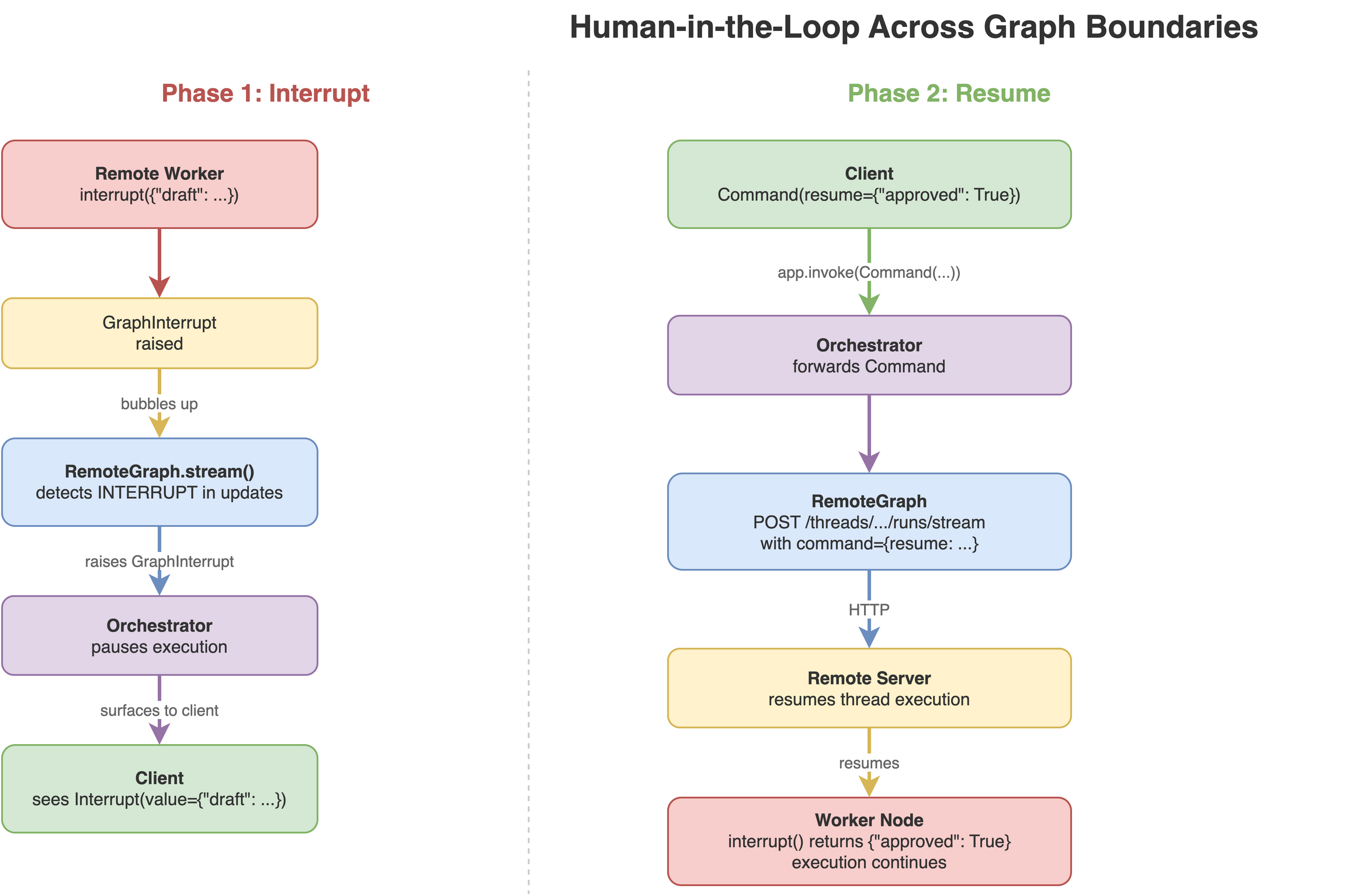
This just works. When a remote graph calls interrupt(), the interrupt bubbles up through the orchestrator to the client:
# Inside the remote coding agent (deployed separately):
def migration_node(state):
    migration = generate_migration(state)
    approval = interrupt({"sql": migration, "question": "Run this migration?"})
    if approval["approved"]:
        run_migration(migration)
    return {"result": "Migration applied"}
The orchestrator’s client sees the interrupt:
state = app.get_state(config)
print(state.interrupts)  # [Interrupt(value={"sql": "ALTER TABLE...", "question": "..."})]

# Resume
app.invoke(Command(resume={"approved": True}), config=config)
The resume command flows back through the orchestrator, through the RemoteGraph, to the correct thread on the remote server. No plumbing required.
Independent Checkpointing
Each graph in the system checkpoints independently. The orchestrator stores its routing decisions and accumulated results. Each remote graph stores its own internal conversation and tool call history. They don’t share a database.
This is a feature, not a limitation. It means:
- You can inspect and replay the orchestrator’s workflow without touching worker state
- Each team controls their own persistence backend (SQLite for dev, Postgres for prod)
- Checkpoint storage scales independently per service
- Time-travel debugging works at each layer
# Inspect orchestrator history
for snapshot in app.get_state_history(config, limit=5):
    print(f"Step {snapshot.metadata['step']}: next={snapshot.next}")

# Inspect a remote graph's history directly
remote = RemoteGraph("research-agent", url="https://research.example.com")
for snapshot in remote.get_state_history(remote_config, limit=5):
    print(f"Step {snapshot.metadata['step']}: next={snapshot.next}")
Error Handling
Remote calls fail. Networks are unreliable. LangGraph gives you retry policies at the node level:
from langgraph.types import RetryPolicy

graph.add_node(
    create_remote("research"),
    retry_policy=RetryPolicy(
        max_attempts=3,
        initial_interval=1.0,
        backoff_factor=2.0,
    ),
)
For more control, wrap the remote call:
def resilient_research(state):
    try:
        return create_remote("research-v2").invoke(state)
    except RemoteException:
        return create_remote("research-v1").invoke(state)  # fallback to previous version
Remote errors surface as RemoteException. Interrupts surface as GraphInterrupt. Commands surface as ParentCommand. Each has distinct handling semantics – they’re not lumped together.
Hierarchical Delegation
Remote graphs can send commands back to their parent orchestrator using Command(graph=Command.PARENT). This enables hierarchical team structures:
Orchestrator
+-- Team Lead A (remote)
|   +-- Worker A1 (remote)
|   +-- Worker A2 (remote)
+-- Team Lead B (remote)
    +-- Worker B1 (remote)
A worker can escalate to its team lead. A team lead can escalate to the orchestrator. The ParentCommand mechanism handles this at any nesting depth.
# Worker inside a remote team graph
def worker(state):
    if state["confidence"] < 0.5:
        return Command(
            graph=Command.PARENT,
            update={"needs_help": True},
            goto="escalation_handler",
        )
    return {"result": do_work(state)}
Deployment
Each graph deploys independently. A langgraph.json config file defines the graph entry point:
{
    "python_version": "3.12",
    "dependencies": ["./requirements.txt"],
    "graphs": {
        "research-agent": "./graphs/research.py:graph"
    }
}
Then deploy:
langgraph up --port 8001
Or use langgraph dev for local development with hot-reloading. In development, all your remote graphs can run on localhost with different ports. In production, they’re separate services behind separate URLs.
The orchestrator itself can be deployed the same way, or it can run as a local script. It’s just a graph that happens to call other graphs over HTTP.
Observability
Enable distributed_tracing=True on your RemoteGraph instances to get unified traces in LangSmith across all services:
research = RemoteGraph(
    "research-agent",
    url="https://research.example.com",
    distributed_tracing=True,
)
One trace shows the full journey: orchestrator routing -> research agent searching -> coding agent generating -> reviewer checking. Latency breakdowns, token counts, and error attribution across the entire distributed system.
You can also visualize the full graph topology:
app.get_graph(xray=2).draw_mermaid_png()
This renders the orchestrator graph with remote subgraph internals expanded to a depth of 2.
When to Use This
Use multi-graph orchestration when:
- Different teams own different agents and need independent deploy cycles
- You need to scale agents independently (the research agent needs GPUs, the router doesn’t)
- You want to version and rollback agents independently
- Your system has natural domain boundaries (research vs. coding vs. review)
- You need fault isolation – one agent crashing shouldn’t take down the system
Stick with a single graph when:
- One team owns everything
- Agents share most of their state
- The overhead of HTTP calls isn’t worth the architectural benefits
- You’re prototyping and speed of iteration matters more than deployment flexibility
The Takeaway
The key design decision in LangGraph is that PregelProtocol is the universal interface. A compiled StateGraph, a @entrypoint function, and a RemoteGraph HTTP client all implement it. This means composition is free – you don’t pay an abstraction tax for going distributed.
Build your agents as independent graphs. Deploy them separately. Wire them together with an orchestrator that treats each one as just another node. Streaming, interrupts, checkpointing, and error handling work across the boundaries without additional code.
The gap between “it works on my laptop” and “it works in production across five services” is smaller than you’d expect.
If you found this useful, feel free to connect on LinkedIn or check out my projects on GitHub.